

A business expense rarely begins with the accounting entry.
Someone needs to spend company money first.
They make a request.
Someone approves it.
Finance disburses the money.
The expense happens.
A receipt or supporting document is collected.
Then the transaction eventually needs to make its way into the company's books.
When each part of that process happens in a different place, finance teams are left doing the work of connecting everything manually.
Flex is built to connect that process from beginning to end.
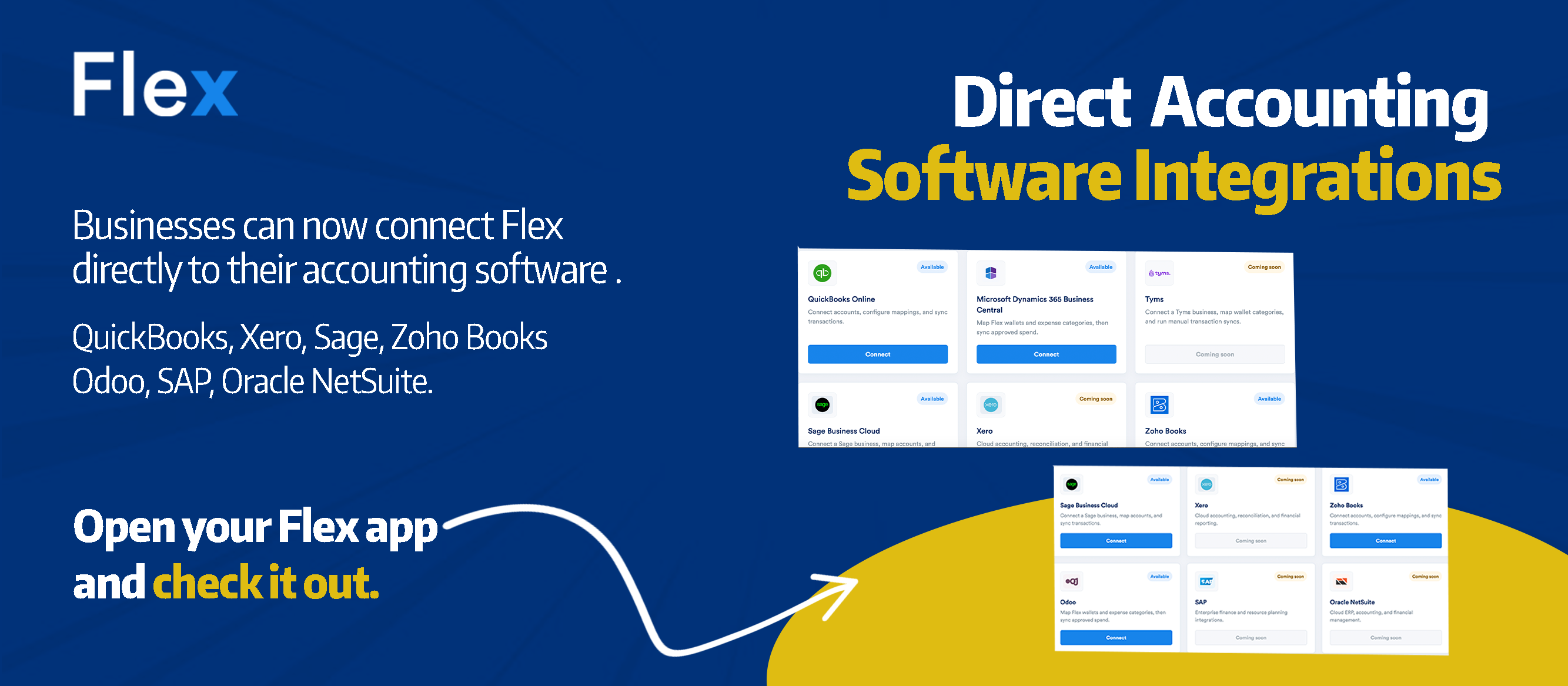
And now, Flex can connect directly with accounting software including QuickBooks, Xero, Sage, Zoho Books, Odoo, SAP, Oracle NetSuite and more.
From expense request to accounting
Flex helps businesses manage company spending from the moment money is requested.
The workflow can look like this:
Request → Approval → Disbursement → Receipt → Record → Accounting
An employee can submit an expense request on Flex.
The appropriate approver can review it.
Once approved, the payment can be disbursed.
Receipts and supporting documents can be attached to the expense.
And with Flex accounting integrations, the financial data can connect with the accounting software your business already uses.
Instead of treating expense management and accounting as two completely separate processes, your finance team gets a more connected workflow.
Connect Flex to the accounting software you already use
You do not have to change your accounting software to use Flex.
Flex connects with popular accounting and ERP platforms including:
- QuickBooks
- Xero
- Sage
- Zoho Books
- Odoo
- SAP
- Oracle NetSuite
- And more
Your finance team can continue using the accounting system it knows while Flex manages the business spending workflow around it.
Your spending in Flex. Your books in your accounting software. Now they work together.
Why connect expense management with accounting?
Think about what happens when these systems are disconnected.
A request may begin somewhere.
The approval happens somewhere else.
The payment is made.
Someone collects the receipt.
Then finance has to recreate or reconcile that information inside the accounting system.
That creates more manual work than necessary.
Connecting Flex with your accounting software helps create a clearer path between why money was requested, who approved it, what was paid and how the expense is recorded.
For finance teams, that can mean less time spent moving information between systems and more visibility into the complete spending process.
More than an accounting integration
The accounting connection is the final part of a much larger workflow.
Flex gives businesses a central place to manage company spending before, during and after money leaves the business.
Expense Requests
Employees can request money through a structured process instead of relying on scattered or informal requests.
The business has a record of what was requested and why.
Approvals
Requests can move through the appropriate approval workflow before company money is spent.
Flex also supports Multi Approval, allowing approvers to process up to 100 requests at once.
Disbursements
Once a request is approved, authorised disbursers can make payments through Flex.
With Multi Disbursement, teams can also process multiple approved requests at once.
Receipts and Spend Records
Receipts and supporting documentation can stay connected to the underlying business expense, giving finance teams a clearer record of company spending.
Spend Controls
Businesses can define how company money is used.
Flex Spend Controls can include spending limits and rules around when employees and accounts are allowed to spend, including specific days and times.
Budgets
Teams can create budgets, track spending against them and monitor how company money is being used.
Budgets can be managed through Flex on both mobile and web.
Virtual Cards
Businesses can create virtual cards for company spending, monitor card usage and see upcoming recurring payments associated with cards.
Accounting Integrations
Finally, Flex can connect this spending activity with the accounting software your finance team already uses.
The result is a more complete spending workflow.
One connected business spending process
Consider a simple company expense.
A member of the operations team needs ₦500,000 for a supplier payment.
Instead of starting with an unstructured request, the employee raises the request on Flex.
The appropriate manager reviews and approves it.
Finance disburses the payment.
The supporting receipt or documentation is attached.
The business has a record of the transaction.
And the financial data can connect with the company's accounting system.
What started as an expense request becomes part of a traceable financial workflow.
That is what end-to-end spend management should look like.
Flex does not replace your accounting software
Accounting software and spend management software solve different parts of the financial process.
Your accounting software remains where your business maintains its books and accounting records.
Flex helps manage the activity that often happens before the accounting entry exists.
Who requested the money?
What was it for?
Who approved it?
Was it within budget?
Who made the payment?
Where is the receipt?
Flex helps capture and manage those steps.
Then the accounting integration helps connect that spending activity with your books.
Spend on Flex. Keep your books connected.
Businesses should not have to choose between having a controlled expense process and keeping their accounting records up to date.
With Flex, finance teams can manage:
Requests
Approvals
Disbursements
Spend controls
Budgets
Virtual cards
Receipts and records
Accounting integrations
All as parts of one business spending workflow.
Ready to connect your business spending?
Connect Flex with QuickBooks, Xero, Sage, Zoho Books, Odoo, SAP, Oracle NetSuite and more.
Frequently Asked Questions
What accounting software does Flex Finance integrate with?
Flex supports accounting integrations including QuickBooks, Xero, Sage, Zoho Books, Odoo, SAP and Oracle NetSuite, with additional integrations available.
Can I connect QuickBooks to Flex Finance?
Yes. Businesses using QuickBooks can connect their accounting workflow with Flex, allowing spending managed through Flex to work more closely with their accounting records.
Does Flex integrate with Xero?
Yes. Flex supports integration with Xero as part of its accounting integration offering.
Does Flex integrate with Sage?
Yes. Businesses using Sage can connect it with Flex to create a more connected workflow between business spending and accounting.
Does Flex integrate with Zoho Books?
Yes. Zoho Books is one of the accounting platforms supported by Flex.
Does Flex replace accounting software?
No. Flex complements your accounting software.
Flex manages the business spending workflow, including expense requests, approvals, disbursements, budgets, controls, receipts and records. Your accounting software continues to serve as your accounting system.
What is spend management software?
Spend management software helps businesses control and manage how company money is requested, approved, spent and recorded.
Flex brings these processes together so businesses can manage spending from the original expense request through payment and accounting.
Can Flex manage expense approvals?
Yes. Flex allows businesses to create structured approval workflows for company expenses. Approvers can also use Multi Approval to process up to 100 requests at once.
Can Flex handle payments after an expense is approved?
Yes. Approved requests can move to authorised disbursers for payment through Flex, keeping the request, approval and disbursement within the same workflow.
Final CTA
Manage business spending from request to accounting.
Bring expense requests, approvals, disbursements, records and accounting closer together with Flex Finance.
Share this post




.png)



.png)