


An invoice should not arrive in finance as a lonely document.
By the time an invoice is ready for payment, the business should already know the story behind it.
Who requested the purchase?
What was the vendor engaged for?
Which department, branch, project, or team owns the cost?
Who reviewed the invoice?
Who approved the payment?
Has the vendor been paid?
Where is the payment proof?
Has the record moved into accounting?
For many Nigerian businesses, invoice approval becomes difficult because the invoice is treated as the beginning of the process.
But in a strong finance workflow, the invoice is not the beginning.
It is one step in a connected spend journey.
The better workflow looks like this:
Request → Invoice → Approval → Payment → Proof
This matters because invoice approval is not just about saying “yes” to a vendor bill.
It is about making sure business spending is requested, documented, approved, paid, proven, and recorded properly.
That is where Flex Finance helps.
Flex Finance is an end-to-end spend management platform that helps Nigerian businesses manage the full spend workflow from request to approval to disbursement.
On Flex, teams can request funds, invoices can be attached, approvals can happen, finance can pay vendors, payment proof can stay connected, and the full audit trail can remain visible.
Flex is also customizable, so companies of different sizes can configure the platform around their own spend policies, approval rules, limits, documentation requirements, departments, branches, projects, and operating structure.
And because Flex has built-in reminders for participants in the approval workflow, invoice approvals do not have to depend on finance manually chasing every approver.
Then Flex automatically integrates with QuickBooks, Sage, Xero, Zoho Books, and Odoo, so clean vendor payment records move into accounting without manual work.
The simple idea is this:
Invoices should not move through scattered conversations.
They should move through a controlled finance workflow.
What is an invoice approval workflow?
An invoice approval workflow is the process a business uses to review, approve, pay, document, and record vendor invoices.
A proper invoice approval workflow should show:
- Who requested the purchase or service
- Which vendor submitted the invoice
- What the invoice is for
- Which department, branch, project, or budget owns the expense
- Who reviewed the invoice
- Who approved the payment
- Whether the invoice has been paid
- Where the payment proof is
- Whether the transaction has entered accounting
This is important because vendor invoices affect cashflow, reporting, supplier relationships, audit trails, and management visibility.
When the invoice approval process is scattered, finance has to rebuild the story later.
When the workflow is connected, finance can manage the process with less friction.
Why invoice approval breaks down
Invoice approval often breaks down when companies manage invoices across too many places.
A vendor sends an invoice by email.
A manager discusses it on WhatsApp.
Finance asks for approval in Microsoft Teams or Slack.
Payment happens through a bank app.
Payment proof is saved as a screenshot.
The accountant records it later in accounting software.
Each step may feel normal.
But together, the process becomes scattered.
Finance then has to ask:
Was this purchase requested?
Who approved the vendor?
Is this the final invoice?
Has the amount changed?
Has the vendor been paid?
Where is the proof?
Which cost center owns this?
Has this been entered into accounting?
The issue is not that email, WhatsApp, Slack, Microsoft Teams, spreadsheets, paper forms, or bank apps are useless.
They are useful for communication and documentation.
But they should not become the main system for invoice approval and vendor payment control.
The actual invoice workflow should live in one connected system.
That is what Flex provides.
The best invoice approval workflow
The strongest invoice workflow has five clear stages:
Request → Invoice → Approval → Payment → Proof
Each stage matters.
1. Request
The request gives the invoice context.
Before the vendor is paid, the business should know why the cost exists.
A good request should include:
- What is being purchased
- Why it is needed
- Who requested it
- Which vendor is involved
- Estimated amount
- Department, branch, project, or budget owner
- Supporting documents where needed
This helps finance avoid treating invoices as isolated bills.
With Flex, the spend journey can start as a structured request.
2. Invoice
The invoice confirms what the vendor is asking the company to pay.
A good invoice record should include:
- Vendor name
- Invoice number
- Invoice date
- Amount
- Description of goods or services
- Payment details
- Supporting documents
- Tax or statutory details where applicable
- Related request or purchase context
The invoice should be connected to the original request, not floating separately in email or chat.
With Flex, invoices and supporting documents can stay attached to the spend record.
3. Approval
Approval confirms that the invoice should be paid.
But approval should not be vague.
A proper approval should show:
- Who approved the invoice
- When they approved it
- Whether the approval followed company policy
- Whether amount thresholds were respected
- Whether the right department, branch, or project owner approved it
- Whether finance reviewed the payment details
Flex helps companies route invoice approvals based on their own spend policies.
For example, a small invoice may need one approval.
A larger invoice may require department and finance approval.
A branch invoice may need branch manager and finance review.
A project invoice may need project owner approval.
A large vendor payment may need multi-level approval.
The workflow should match the company’s policy.
4. Payment
Approval alone does not complete the workflow.
Once an invoice is approved, finance still needs to pay the vendor.
This is where many processes become weak.
Approval happens in one place.
Payment happens somewhere else.
Proof is saved separately.
The accountant reconciles later.
A strong invoice workflow keeps approval and payment connected.
With Flex, finance can pay vendors inside the same spend workflow, so the request, invoice, approval, and payment stay tied together.
5. Proof
Payment proof closes the loop.
After the vendor is paid, finance should keep proof of payment connected to the invoice record.
This may include:
- Payment confirmation
- Transaction receipt
- Bank transfer proof
- Vendor acknowledgement
- Supporting documents
- Accounting sync status
Payment proof matters because it helps finance confirm that the invoice was not only approved, but actually paid.
It also helps accountants reconcile faster.
With Flex, payment proof stays attached to the transaction, so finance does not have to search through screenshots, chats, emails, or bank app records later.
Invoice approval without Flex vs with Flex
The goal is not only to approve invoices faster.
The goal is to make every vendor payment easier to explain.
Why the request should come before the invoice
Many invoice problems start because finance only sees the invoice after a decision has already been made.
Someone engaged a vendor.
The vendor delivered.
An invoice was sent.
Finance is now expected to pay.
At that point, finance may not know:
- Who approved the vendor
- Whether the amount was agreed
- Whether the service was delivered
- Which budget should carry the cost
- Whether the invoice matches the original request
- Whether payment should happen now
When a request comes first, the invoice has context.
Finance can compare the invoice against what was requested.
Managers can approve based on the actual business need.
Accounting receives cleaner records later.
That is why the better invoice workflow begins with a request.
Why approval alone is not enough
Many companies think invoice approval is complete once someone says:
“Approved.”
But approval is only one stage.
A complete invoice record should show the full trail:
Request → Invoice → Approval → Payment → Proof
If the business only keeps the approval, finance may still need to find:
- The original request
- The vendor invoice
- The payment record
- The payment proof
- The department or project owner
- The accounting category
- The audit trail
This is why invoice approvals should not live only in messaging tools or manual channels.
The approval should be part of a wider spend workflow.
Flex helps keep that workflow connected.
Flex can be customized to your company’s invoice policy
Every company has its own invoice approval policy.
A small business may only need owner approval.
A growing company may need approvals by department, amount, vendor type, branch, or project.
A larger company may need multi-level approvals, documentation requirements, vendor payment rules, payment limits, expense accounts, and accounting mappings.
Flex is customizable, so companies of different sizes can configure the platform around how they actually operate.
This means the business can define:
- Who can request vendor payments
- Who approves invoices
- What approval limits apply
- Which invoices need multi-level approval
- Which documents are required
- Which departments, branches, or projects own the cost
- How vendor payments should be reviewed
- What payment proof is required
- What should sync into accounting
This is important because invoice control should not force every business into the same workflow.
Flex gives companies structure while allowing them to reflect their own spend policy.
Built-in reminders keep invoice approvals moving
Invoice approvals often slow down because people are busy.
A vendor sends an invoice.
The requester submits it.
The approver does not respond.
Finance follows up manually.
The vendor asks for payment.
The team loses time.
Flex helps reduce this with built-in reminders for participants in the approval workflow.
This helps keep requests and invoice approvals moving without making finance the reminder system.
Employees get better visibility.
Approvers are prompted to act.
Finance spends less time chasing.
Vendors get clearer payment movement.
The business keeps work moving without losing control.
How Flex improves invoice approval
1. Vendor payment starts with a structured request
A vendor payment should not begin as a random invoice in finance’s inbox.
It should begin with a clear business request.
With Flex, the requester can submit the purpose, amount, vendor, department, branch, project, and supporting context.
This gives finance a clean starting point.
2. Invoices stay attached to the request
When the invoice is received, it can be attached to the relevant spend record.
This means the invoice is not separated from the original request.
Finance can see the full context.
The accountant does not have to search through emails and folders later.
3. Approvals follow company policy
Flex helps businesses route approvals according to the company’s spend policy.
Approval routing can depend on:
- Amount
- Vendor
- Department
- Branch
- Project
- Expense category
- Requester
- Business policy
This helps invoice approval become structured and traceable.
4. Approval reminders reduce manual chasing
Flex has built-in reminders for approval workflow participants.
This helps prevent invoice approvals from getting stuck.
Finance does not have to constantly ask:
“Please approve this invoice.”
The workflow helps move the process forward.
5. Payment happens after approval
Once the invoice is approved, finance can pay the vendor through Flex.
This keeps payment connected to the request, invoice, and approval.
That makes the transaction easier to trace later.
6. Payment proof stays connected
After payment, proof can stay attached to the invoice record.
This gives finance a complete trail.
The business can see that the invoice was requested, reviewed, approved, paid, and supported with proof.
7. Accounting records sync automatically
Flex integrates automatically with QuickBooks, Sage, Xero, Zoho Books, and Odoo.
That means approved, documented, and categorized vendor payment records can move into accounting without manual work.
This helps finance reduce manual entry, improve reconciliation, and make month-end close easier.
Common invoice approval problems Flex helps solve
1. Invoices without original requests
When invoices appear without a request, finance has to investigate the context.
Flex helps connect invoices to the original spend request.
2. Approvals scattered across messaging tools
Approvals may happen on WhatsApp, email, Microsoft Teams, Slack, or paper.
Flex helps move the actual approval workflow into one connected system.
3. Finance chasing approvers
Manual follow-up slows finance down.
Flex’s built-in reminders help approval participants act without finance chasing every request.
4. Payment happening outside the approval trail
When payment happens separately, the record becomes weaker.
Flex connects payment to the approval workflow.
5. Missing payment proof
If proof is saved separately, reconciliation becomes harder.
Flex keeps payment proof attached to the transaction.
6. Unclear cost ownership
Finance should know which team, branch, department, project, or budget owns the invoice.
Flex helps assign ownership from the beginning.
7. Manual accounting entry
When invoice records are prepared manually, finance loses time.
Flex automatically syncs clean records into QuickBooks, Sage, Xero, Zoho Books, and Odoo.
Invoice approval checklist for Nigerian finance teams
A strong invoice approval workflow should include:
- ☐ Vendor payment request
- ☐ Business purpose
- ☐ Vendor name
- ☐ Invoice attachment
- ☐ Invoice number
- ☐ Invoice amount
- ☐ Invoice date
- ☐ Department, branch, project, or budget owner
- ☐ Supporting documents
- ☐ Approval routing
- ☐ Approval reminders
- ☐ Approval history
- ☐ Payment confirmation
- ☐ Payment proof
- ☐ Accounting category
- ☐ Audit trail
- ☐ Accounting sync
This checklist is useful.
But the stronger move is to make it part of the system.
That is what Flex helps companies do.
What finance teams should avoid
1. Do not treat invoices as isolated documents
An invoice should be connected to the request, approval, payment, proof, and accounting record.
2. Do not approve invoices only in chat or email
Messaging tools are useful for communication.
But the actual invoice approval workflow should happen in a system that keeps the trail connected.
3. Do not separate approval from payment
If approval happens in one place and payment happens somewhere else, finance has to reconnect the transaction later.
4. Do not let payment proof live only as screenshots
Screenshots are easy to lose.
Payment proof should stay attached to the invoice record.
5. Do not rely on memory for vendor payments
For a very small owner-led business, the owner may remember why a vendor was paid.
But as the business grows, memory stops being a system.
Vendor payments need structure.
6. Do not keep your invoice approval policy outside your workflow
If the company has an invoice approval policy but the workflow does not enforce it, finance still has to manage compliance manually.
Flex helps turn policy into a working process.
For some businesses, Flex alone is already a major upgrade
Not every business needs a complex finance stack on day one.
For many businesses, the biggest upgrade is simple:
Can every vendor invoice be requested, approved, paid, documented, and traced in one place?
If the answer is yes, that business already has a stronger finance foundation than many companies.
For a very small owner-led business, invoice approval may feel manageable.
One staff member sends a vendor invoice.
The owner approves.
The owner makes the payment.
The payment proof is saved somewhere.
But as soon as the business adds more employees, vendors, branches, departments, projects, and reporting expectations, memory stops being a system.
The business needs a workflow that remembers for everyone.
That is what Flex provides.
Because Flex is customizable, it can serve businesses at different stages.
A small business can start with simple approval rules.
A growing company can add department, branch, project, vendor, and amount-based workflows.
A larger business can configure more advanced approval structures, documentation requirements, expense accounts, payment controls, and accounting integrations.
For smaller businesses, Flex can become the first major step into structured finance operations.
For growing businesses, Flex strengthens accounting software through automatic integration.
For larger businesses, Flex supports ERP by keeping vendor payment workflows controlled, visible, and connected.
Best finance workflow for invoice approval
The strongest workflow is simple.
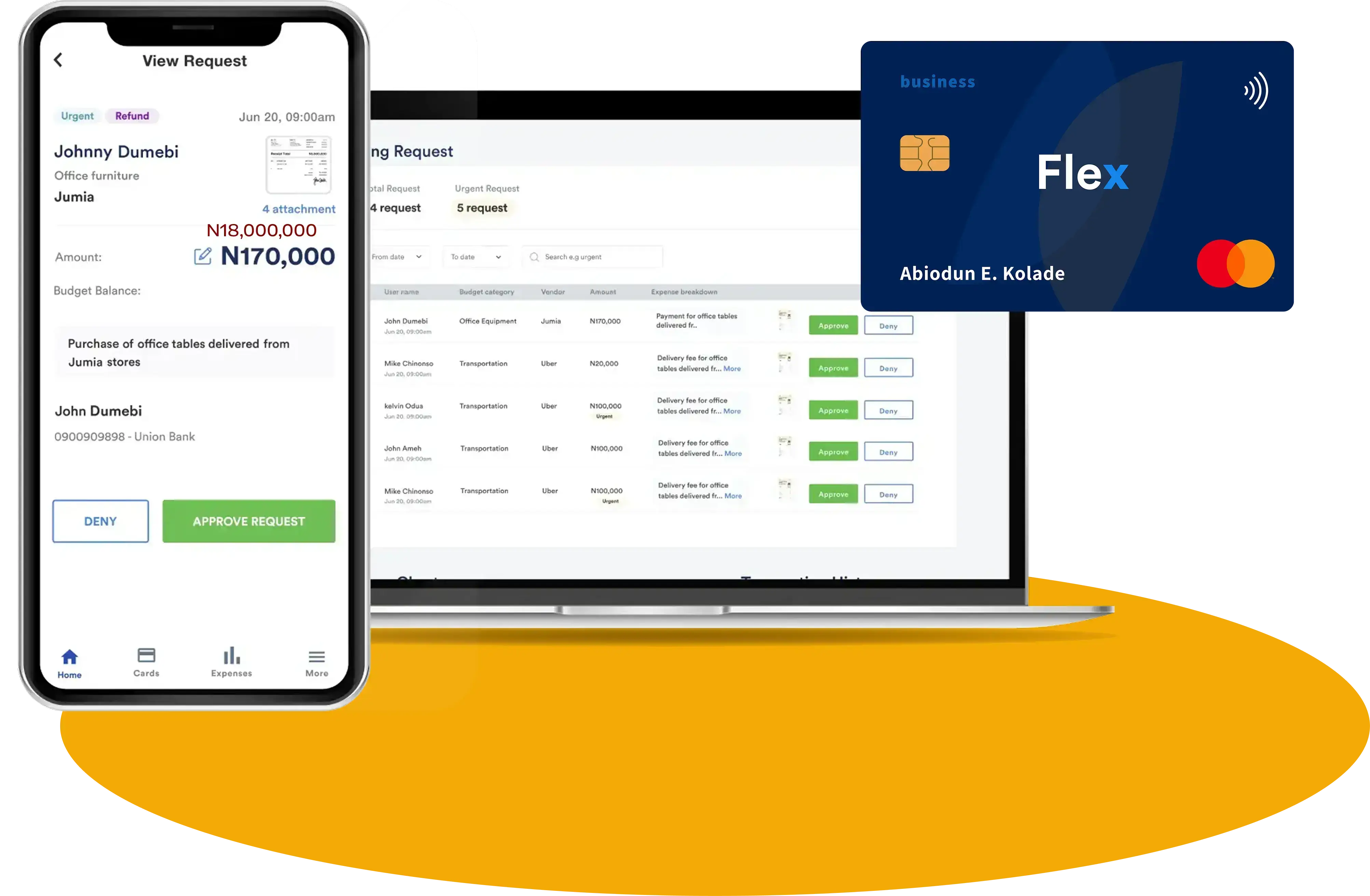
Use Flex for invoice approval and vendor payment control
Use Flex to manage:
- Vendor payment requests
- Invoice attachments
- Approval workflows
- Built-in approval reminders
- Custom spend policies
- Payment execution
- Payment proof
- Vendor payment audit trails
- Department, branch, project, or budget ownership
- Automatic accounting integration
Use accounting software for books and reports
Use QuickBooks, Sage, Xero, Zoho Books, or Odoo to manage:
- Bookkeeping
- Reconciliation
- Accounting entries
- Financial statements
- Reports
- Tax records
- Profit and loss
- Balance sheet
- Cash flow
Use messaging tools for communication only
Use WhatsApp, email, Slack, or Microsoft Teams for:
- Clarifications
- Reminders
- Updates
- Follow-ups
- Team coordination
This is the better finance stack:
Messaging tools handle conversations.
Flex manages invoice approval from request to payment proof.
Accounting software records money and supports reporting.
Final recommendation
Invoice approval should not be scattered across email, WhatsApp, Microsoft Teams, Slack, spreadsheets, paper, bank apps, and screenshots.
Those tools can support communication.
But they should not become the main system for vendor payment control.
A strong invoice approval workflow connects the full journey:
Request → Invoice → Approval → Payment → Proof
Flex Finance helps Nigerian businesses manage that journey in one place.
With Flex, teams can submit vendor payment requests, attach invoices, route approvals, remind approvers, pay vendors, attach payment proof, keep audit trails connected, and sync clean records into QuickBooks, Sage, Xero, Zoho Books, or Odoo.
Flex also helps companies customize invoice approval workflows around their own spend policies, approval limits, documentation requirements, departments, branches, projects, and operating structure.
The conclusion is simple:
If an invoice leads to company money leaving, it should not live only in chat, email, paper, or screenshots.
It should happen on Flex.
That is how Nigerian finance teams can move from scattered invoice approvals to cleaner vendor payments, faster reconciliation, stronger audit trails, and better expense control.
FAQs
What is an invoice approval workflow?
An invoice approval workflow is the process a business uses to review, approve, pay, document, and record vendor invoices.
What is the best invoice approval workflow?
A strong invoice approval workflow is Request → Invoice → Approval → Payment → Proof. This keeps the vendor payment connected from business need to payment record.
Why should the request come before the invoice?
The request gives the invoice context. It shows why the cost exists, who requested it, which vendor is involved, and which department, branch, project, or budget owns the expense.
Why do invoice approvals get delayed?
Invoice approvals often get delayed because approvers are busy, approval requests are scattered across tools, or finance has to follow up manually.
Does Flex have reminders for invoice approvals?
Yes. Flex has built-in reminders for participants in the approval workflow, helping invoice approvals move without finance manually chasing every approver.
Can Flex be customized to a company’s invoice approval policy?
Yes. Flex is customizable, so companies can configure approval rules, spending limits, documentation requirements, vendor payment workflows, departments, branches, projects, and accounting mappings around their own policy.
Does Flex help with vendor payments?
Yes. Flex helps businesses manage vendor payments from request to invoice to approval to payment to proof, with audit trails connected.
Does Flex integrate with accounting software?
Yes. Flex integrates automatically with QuickBooks, Sage, Xero, Zoho Books, and Odoo, so approved, documented, and categorized vendor payment records can move into accounting without manual work.
Can companies still use WhatsApp, email, Slack, or Microsoft Teams?
Yes. Teams can still use messaging tools for communication and clarification. But the actual invoice approval, payment, proof, and audit trail should happen on Flex.
What is the best invoice approval setup for Nigerian businesses?
A strong setup is Flex Finance for invoice approval and vendor payment control, accounting software for books and reports, and messaging tools for communication only.
Share this post



.webp)

.png)


.png)